useMemo
Every time a React component re-renders, it redoes all its work, including rebuilding scales and re-preparing data.
useMemo caches that work so it only happens when the inputs actually change. Let's use it to keep charts snappy.
The React life cycle
A React application builds a user interface by assembling a set of components. A root component calls a few children, each calling their own children, and so on until you reach the leaves of the tree.
This user interface can be alive!
Clicking a button or hovering an element can trigger a state update. When a state updates, the component rerenders → all its code runs again to refresh the component and make sure the changes appear on screen.
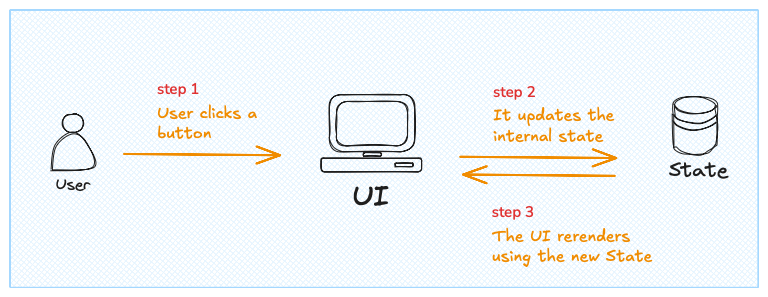
It does not end here.
When a component rerenders, the props passed to its child components are updated too, which triggers a rerender of those children as well. And so on.
That's the life cycle of a React application.
❌ The problem
Let's say you're building a histogram from 10,000 points.
There is one task that is expensive to compute: the binning. Splitting all the data points into buckets and counting how many fall into each one.
Then you add a hover effect: each time the mouse moves over a bar, you change its color.
If, for whatever reason, you need an internal state for this, the component rerenders every time a new bar is hovered. As a result, the binning step runs again and... your chart lags 😱:
import { useState } from 'react';
import * as d3 from 'd3';

const width = 420;
const height = 200;

const data = Array.from({ length: 5000000 }, () => Math.random() * 1000000);

export default function App() {
  const [hovered, setHovered] = useState(null);

  // this will take time
  const bins = d3.bin().domain([0, 100])(data);

  const xScale = d3.scaleLinear().domain([0, 100]).range([0, width]);

  const yScale = d3
    .scaleLinear()
    .domain([0, d3.max(bins, (b) => b.length)])
    .range([height, 0]);

  return (
    <svg width={width} height={height} style={{ fontFamily: 'system-ui' }}>
      {bins.map((b, i) => (
        <rect
          key={i}
          x={xScale(b.x0) + 1}
          y={yScale(b.length)}
          width={Math.max(0, xScale(b.x1) - xScale(b.x0) - 2)}
          height={height - yScale(b.length)}
          fill={hovered === i ? '#e0820f' : '#9a6fb0'}
          onMouseEnter={() => setHovered(i)}
        />
      ))}
    </svg>
  );
}
Note: lag is going to be more or less intense depending on your machine.
Recomputing the binning just to update a color is wasteful! The component should remember the bins and only update the color.
Well, that's exactly what useMemo does.
✅ Solution: useMemo to cache
useMemo does exactly this: it lets you control when a variable is computed again.
It's a function provided by React that expects 2 arguments.
Oh no! 😱
It seems like you haven't enrolled in the course yet!
This is a lesson from the D3 ❤️ React course, where you learn to create bespoke, interactive graphs with d3.js and React.
Enrollment is currently closed. Join the waitlist to be notified when doors reopen, and get 3 free lessons right away:
Or Login