Throttling & debouncing
Let's say you're moving your mouse over a graph. The onMouseMove event fires dozens of times per second. Reacting to every one of them is a fast way to make a chart feel sluggish.
Throttling and debouncing let you handle these events at a sane rate instead. Two small helpers that go a long way.
❌ The problem
Some events fire constantly. mousemove, scroll and resize can each fire dozens of times per second.
Take a scatterplot with a hover effect: on every mouse move, you find the closest point and highlight it, which re-renders all the dots. On a dense chart, that runs far too often and... it lags 😱:
import { useState } from 'react';

const width = 700;
const height = 700;

const points = Array.from({ length: 30000 }, (_, i) => ({
  id: i,
  x: Math.random() * width,
  y: Math.random() * height,
}));

function closest(mx, my) {
  let best = null;
  let bestDist = Infinity;
  for (const p of points) {
    const d = (p.x - mx) ** 2 + (p.y - my) ** 2;
    if (d < bestDist) {
      bestDist = d;
      best = p.id;
    }
  }
  return best;
}

export default function App() {
  const [hovered, setHovered] = useState(null);

  // Runs on EVERY mousemove, then re-renders all 6,000 circles.
  const handleMove = (e) => {
    const rect = e.currentTarget.getBoundingClientRect();
    setHovered(closest(e.clientX - rect.left, e.clientY - rect.top));
  };

  return (
    <svg
      width={width}
      height={height}
      onMouseMove={handleMove}
      style={{ background: '#f7f7f7', borderRadius: 6 }}
    >
      {points.map((p) => (
        <circle
          key={p.id}
          cx={p.x}
          cy={p.y}
          r={hovered === p.id ? 7 : 2}
          fill={hovered === p.id ? '#e0820f' : '#9a6fb0'}
          fillOpacity={0.6}
        />
      ))}
    </svg>
  );
}
The handler fires on every single mousemove, far more often than the screen can even refresh. Most of that work is wasted 😢.
✅ Solution 1: throttle
Throttling runs a function at most once per a given interval, no matter how many times it is called.
When the user moves the mouse over a chart, the onMouseMove handler fires almost continuously, dozens of times per second. Each call is shown as a vertical tick on the diagram below:
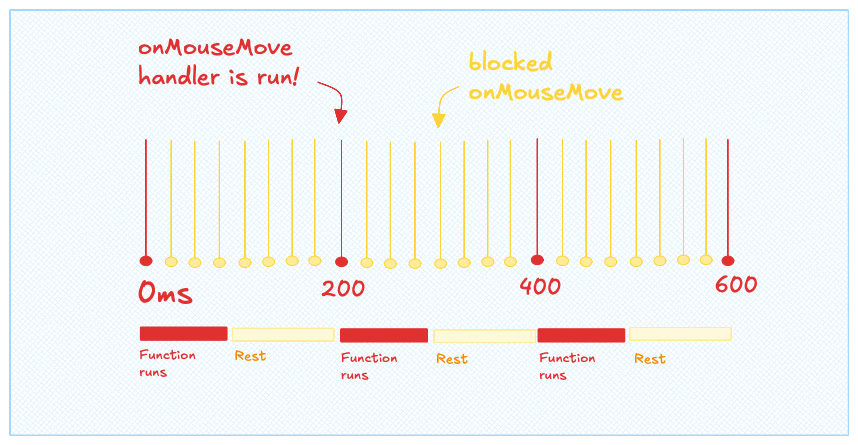
Anatomy of throttling function with a 200ms wait period.
Once the handler is throttled, those events are ignored until the wait period has elapsed (200ms in the diagram). The work now runs on a steady, much slower beat, which takes a lot of load off the browser.
And there is little to lose: the UI cannot update faster than your screen refreshes anyway, so reacting more often than that is wasted effort.
Tip: for purely visual updates (redrawing a canvas, moving a highlight), requestAnimationFrame is often an even better fit than a timer. Instead of "at most once every 100ms", it runs your update once per frame, perfectly in sync with the screen. Reach for it when the throttled work is drawing rather than, say, firing off a network request.
The throttle helper is tiny. Grab it from a library like lodash, or write your own:
// Run fn at most once every wait ms.
function throttle(fn, wait) {
  let last = 0;
  return (...args) => {
    const now = Date.now();
    if (now - last >= wait) {
      last = now;
      fn(...args);
    }
  };
}
The key detail is to build the throttled function once. If you create a brand new one every time, it resets its internal timer and defeats the throttle!
Oh no! 😱
It seems like you haven't enrolled in the course yet!
This is a lesson from the D3 ❤️ React course, where you learn to create bespoke, interactive graphs with d3.js and React.
Enrollment is currently closed. Join the waitlist to be notified when doors reopen, and get 3 free lessons right away:
Or Login