Your first website
Building a website can be as simple as creating a single HTML file. No fancy tools, no complex setup.
Let's create your very first webpage and understand how the browser turns your code into something visual.
📖 What is HTML?
HTML stands for HyperText Markup Language. It's the language that browsers understand. Every website you've ever visited is, at its core, an HTML file that was sent to your browser and displayed on the screen.
Here is an example with a very minimalist website. The HTML code is written (and editable) on the left, and the resulting website is on the right:
<!DOCTYPE html>
<html>
  <head>
    <title>My First Website</title>
  </head>
  <body>
    <h1>Hello World!</h1>
    <p>This is my very first website.</p>
  </body>
</html>
Simple, but that's a real website.
More about this in the Internet explained lesson.
When you type a URL and hit enter, a server sends back an HTML file. Your browser reads it and turns it into the visual page you see.
That's the foundation of the entire internet.
📍 HTML = a collection of elements
HTML is made of elements. An element is a piece of content wrapped in tags. Most elements have an opening tag and a closing tag. For instance, here is how to create a paragraph in HTML, using a <p> element.
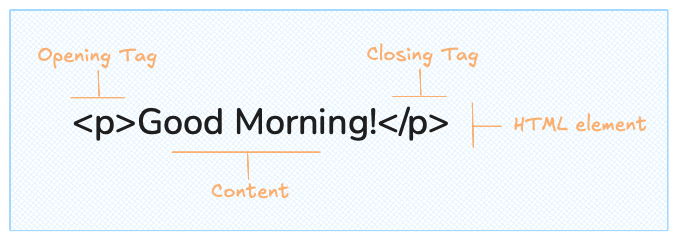
Anatomy of an HTML element
The opening tag (<p>) tells the browser what kind of content follows. The closing tag (</p>) marks where it ends. Everything between the two is the content.
Some elements don't need a closing tag because they have no content inside. These are called self-closing (or void) elements.
Elements can also have attributes — extra information that customizes their behavior. For example, the <img> tag below needs a src attribute to know where to find the image.
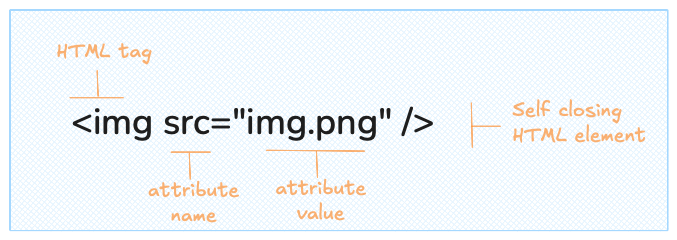
A self-closing element with attributes
🦴 Anatomy of an HTML document
Now that we have a better understanding of how an HTML element is structured, let's look again at our first minimal website:
<!DOCTYPE html>
<html>
  <head>
    <title>My First Website</title>
  </head>
  <body>
    <h1>Hello World!</h1>
    <p>This is my very first website.</p>
  </body>
</html>
Let's break down what each part does:
Oh no! 😱
It seems like you haven't enrolled in the course yet!
This is a lesson from the D3 ❤️ React course, where you learn to create bespoke, interactive graphs with d3.js and React.
Or Login