Strat 4: lift state up
What if hovering a bar chart should also highlight the corresponding slice in a pie chart? For that, the hover state needs to live above both components.
This lesson shows how to lift the state up to synchronize hover effects across multiple charts — a common pattern in dashboards.
The problem
In the previous lesson, we stored the hovered group in a useState inside the chart component. That works great for a single chart.
But what if you have a barplot and a pie chart side by side, both showing the same groups? When you hover group B on the barplot, you want group B to be highlighted on the pie chart too.
The state can't live inside either chart — because one chart can't access the other chart's state. The solution is to lift the state up to a parent component that wraps both charts.
The pattern
The schema below describes an app that contains a barplot and a pie chart component. They're both wrapped in a parent component that has an internal state called hoveredGroup.
There is also a setter function available called setHoveredGroup to update the state. Both the state and the setter functions are passed to both components as props.
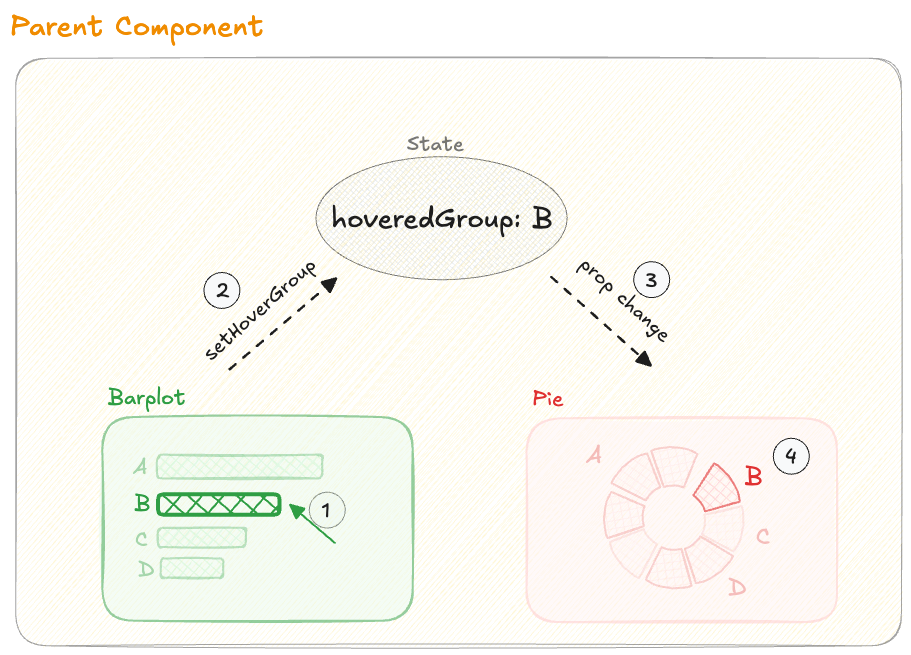
Anatomy of a state update, connecting 2 charts together.
Let's say the user hovers over group B on the barplot. Here's the flow step by step:
1. The mouse hovers over group B on the barplot, triggering onMouseEnter.
Oh no! 😱
It seems like you haven't enrolled in the course yet!
This is a lesson from the D3 ❤️ React course, where you learn to create bespoke, interactive graphs with d3.js and React.
Enrollment is currently closed. Join the waitlist to be notified when doors reopen, and get 3 free lessons right away:
Or Login