JavaScript fundamentals
The previous lessons introduced you to the two first cornerstones of the web: HTML and CSS. But how do we make our webpages interactive?
The answer is JavaScript. It is the programming language of the web that makes websites come alive. This lesson is an introduction to JS, explaining what it is, how to use it and its basics before we dive into its syntax in the next lesson.
What is JavaScript?
When you click a button, how do you make something update on the screen? If you click a bar on a barplot, how do you update a line chart next to it? If you fill a form with your name, how does it get saved to a database?
The answer is JavaScript.
JavaScript is the programming language understood by the browser. You write a script with a set of instructions, and those instructions have the power to modify the webpage.
In the sandbox below, an HTML button is displayed. The HTML button element accepts an onclick attribute. You can provide a JavaScript snippet to this attribute, and it will be triggered when the user clicks the button.
In this case, the script changes the text color to blue:
<!DOCTYPE html>
<html>
  <body>
    <p id="text">Click the button to make me blue!</p>
    <button onclick="document.getElementById('text').style.color = 'blue'">
      Turn blue
    </button>
  </body>
</html>
Interaction with HTML and CSS
The power of JavaScript is its ability to modify the webpage: both the HTML elements and their CSS styles.
The JavaScript code above selected the HTML element with the id text using the getElementById function. Then it changed its style using the CSS color property.
At the end of the day, this is the core use case of JavaScript on the frontend: modifying the webpage structure, also known as the DOM.
What is the DOM?
DOM stands for Document Object Model. When the browser loads an HTML page, it creates a tree-like representation of all the elements: the <body>, the <p> tags, the buttons, everything. This tree is the DOM.
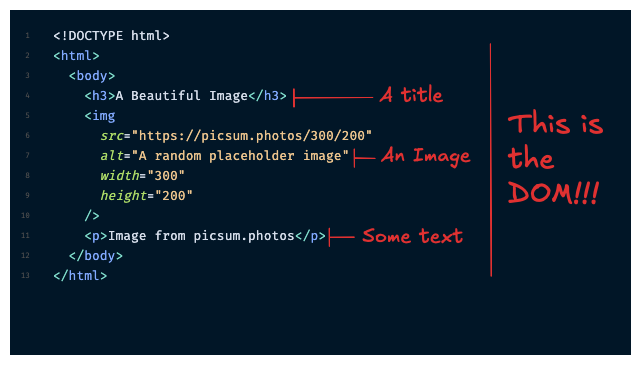
JavaScript can read and modify this tree. That's how it changes text, adds elements, removes them, or updates styles. Every interactive website you've ever used works this way: JavaScript manipulating the DOM.
Oh no! 😱
It seems like you haven't enrolled in the course yet!
This is a lesson from the D3 ❤️ React course, where you learn to create bespoke, interactive graphs with d3.js and React.
Or Login