VS Code
Visual Studio Code is the most popular code editor among web developers. It's free, powerful, and highly customizable.
Let's set it up and learn the essential features that will make your coding experience smooth and efficient.
🛠️ You'll write a lot of code
As a developer, you'll spend most of your time editing text files that contain code. People have been doing this for decades, so the tools for it have become incredibly powerful.
These tools are called code editors. If you're already comfortable with one, stick with it. But if web development is new to you, I strongly recommend starting with Visual Studio Code (VS Code).
It's free, fast, and used by the vast majority of web developers. It's what you'll see in 90% of tutorials online, and it just works.
The interface looks like this:
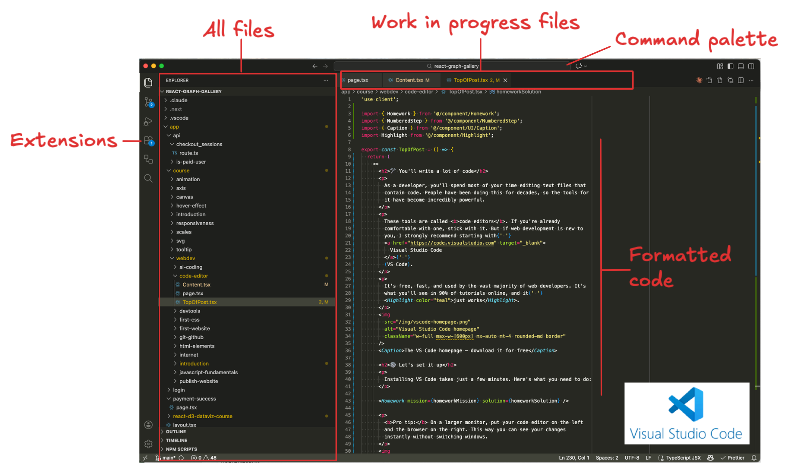
This is how my VS code looks like as I'm writing this lesson!
⚙️ Let's set it up
Installing VS Code takes just a few minutes. Here's what you need to do:
Download VS Code from code.visualstudio.com and install it on your machine.
Open VS Code. Go to File → Open Folder and select the my-website folder you created in the previous lesson.
(⚠️ Always open a folder, not just a file — this is important!)
Click on index.html in the file explorer on the left. Try editing the text, save with Cmd/Ctrl + S, and refresh your browser to see the changes. 🎉
Pro tip: On a larger monitor, put your code editor on the left and the browser on the right. This way you can see your changes instantly without switching windows. There is a little app called Rectangle I love for this.

The ideal setup: code on the left, result on the right
Note that you currently have to refresh your browser (on the right) each time you save your code change (on the left). This is possible with the shortcut cmd + R. In the next lesson we will introduce a concept called hot reload that removes this pain
⌨️ Key shortcuts you'll use daily
You don't need to memorize hundreds of shortcuts. But knowing a handful will make you significantly faster. Here are the ones I use constantly:
| Shortcut | What it does | Importance |
|---|---|---|
Cmd/Ctrl + S | Save the file | 🔴 Essential |
Cmd/Ctrl + P | Quick open — jump to any file by typing its name | 🔴 Essential |
Cmd/Ctrl + Shift + P | Command palette — access any VS Code feature | 🔴 Essential |
Cmd/Ctrl + F | Find text in the current file | 🟠 Very useful |
Cmd/Ctrl + Shift + F | Find text across all files in your project | 🟠 Very useful |
Cmd/Ctrl + D | Select the next occurrence of a word — great for renaming | 🟡 Nice to know |
Cmd/Ctrl + Arrow | Jump to the beginning or end of a line | 🟡 Nice to know |
Don't worry about memorizing these now. Bookmark this page and come back when you need a refresher. They'll become second nature with practice.
A few extensions to install
VS Code becomes even more powerful with extensions. Think of them as plugins that add extra features. Click the Extensions icon in the sidebar to browse them.
Here are the 3 I recommend for beginners. Click on a card to learn more:

Prettier
Automatically formats your code when you save.
Click to learn more →

Color Highlight
Displays colors directly in your code.
Click to learn more →

HTML Tag Wrap
Wrap selected text in HTML tags instantly.
Click to learn more →
👀 See it in action!
You're going to spend a lot of time using VS code. It's important that you get familiar with it to gain in productivity.
Before we switch to the next lesson about CSS, let me show you how I use VS code in my everyday life!
A quick tour of VS code, a very common code editor.
Oh no! 😱
This lesson is not ready yet.
But we're working hard on it, releasing 1-2 lessons per week. If you're a student, check the discord channel for announcements! (
logo above. )
🙇