TypeScript
This course uses JavaScript, but most React codebases in real life use TypeScript: JavaScript plus types. What does it buy you, and is it worth the extra syntax?
This lesson is a gentle introduction to TypeScript for dataviz. You will learn just the foundation of it and hopefully it will convince you to add it to your toolbox rigt away.
🥴 The problem
Let's say you write a tiny function called addFour. It expects a number and returns that number plus 4.
const addFour = (num) => {
  return num + 4;
};
A few months later, a coworker (or future you 🙈) uses it. But the value they pass comes from a form input, so it's a string. Take your time to read the example below and understand what's happening:
const addFour = (num) => {
  return num + 4;
};

const inputValue = "10"; // from a form: always a string!
console.log(addFour(inputValue)); // 😱
"10" + 4 gives "104", not 14. No crash, no error message. The app keeps running with a wrong value, silently, potentially breaking your UI further down the line.
This is a dumb little example, but it's exactly what happens in real life. As functions and components get more complex, it becomes very easy to use them the wrong way, and very hard to know the right way.
✅ The solution: TypeScript
TypeScript is a superset of JavaScript. It's not a different language! It's a layer on top of JavaScript that describes the type of each piece of your code.
Here is the same function, written in TypeScript:
const addFour = (num: number): number => {
  return num + 4;
};
See the : number annotations? We now state explicitly that the input is a number, and that the output is a number too.
Now check what happens when I misuse the function in my code editor:
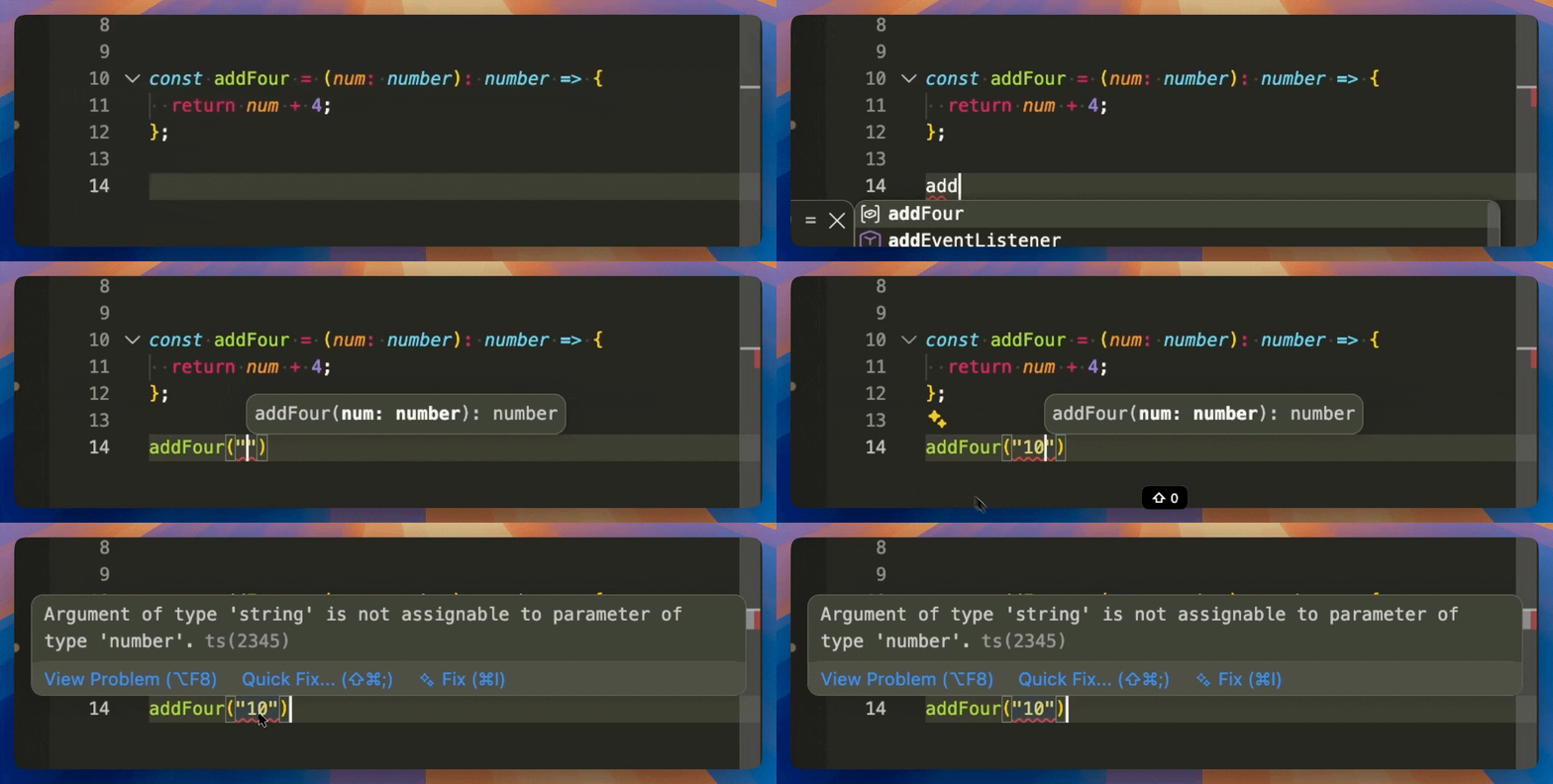
My code editor (VS Code) runs TypeScript in the background. It underlines the mistake while I'm typing, way before I open the browser.
It gets even better. If a change in one file breaks code in another file, TypeScript warns me too.
TypeScript is basically a safety net: most of your bugs show up in the editor, before you even look at your UI.
TypeScript in action
Let me show you a live demo. 100% of my code is written in TypeScript, no exceptions. So here is how it works in real life!
TypeScript's safety net, live in VS Code.
Note the bonus superpower: autocomplete.
Since your editor knows the shape of everything, typing the name of a function lists all the arguments it expects, with their types!
👉 Your turn
The TypeScript Playground is an online editor that runs TypeScript in your browser, nothing to install. It shows TypeScript code on the left, and the JavaScript equivalent on the right.
I've prepared the addFour example for you:
- Hover the red line and read the error.
- Fix the call, for instance with
Number(inputValue), and watch the red line disappear. - Type
addFour(somewhere and look at the autocomplete.
Open the TypeScript Playground
Oh no! 😱
It seems like you haven't enrolled in the course yet!
This is a lesson from the D3 ❤️ React course, where you learn to create bespoke, interactive graphs with d3.js and React.
Enrollment is currently closed. Join the waitlist to be notified when doors reopen, and get 3 free lessons right away:
Or Login