Remote data
Sometimes data can't be stored locally because it keeps changing. What if you want to track the latest value of a currency published by another organization? Or query your company's database for the latest sales?
In that case, you need to fetch the data before plotting it. Let's find out how.
🎣 What is data fetching
Until now, our datasets were sitting right next to our React code, in a data.js file, like any other const.
Sometimes that's good enough for your project. But sometimes, you have to represent data that updates regularly. In this case you have to get the information from somewhere else on the internet. That's a process called data fetching.
Here is an example fetching the Bitcoin price from the CoinGecko API:
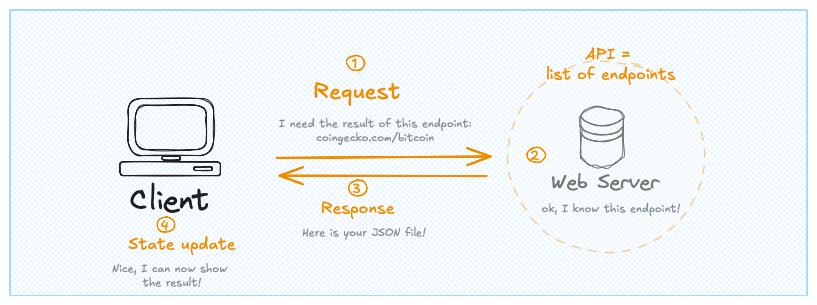
Data fetching split in 4 main steps
The process starts with an HTTP request. We use a JavaScript function called fetch that expects at least one argument: a URL we call an endpoint.
This request then reaches the endpoint. In other words, it lands on a web server that exposes an API: a set of predefined endpoints, each returning a specific piece of data. That's step 2.
The web server generates a response: a JSON file that comes back to us, the client. We can now update the state of our application and display the result.
It's important to understand that this process is asynchronous. We first load the application with empty graphs. Then we fetch the data, which can take a while, but the app stays usable in the meantime. When the data arrives, we update the application.
Try it
The word API can sound intimidating, because it covers many different use cases and is often poorly explained.
So let's try something concrete. The URL below is a public endpoint of the CoinGecko API. Copy it, paste it into a new tab, and you'll see a JSON response with the current Bitcoin price. That's it: you just made an API request!
https://api.coingecko.com/api/v3/simple/price?ids=bitcoin&vs_currencies=usdNow we want to do the same thing, but from JavaScript.
Oh no! 😱
It seems like you haven't enrolled in the course yet!
This is a lesson from the D3 ❤️ React course, where you learn to create bespoke, interactive graphs with d3.js and React.
Or Login